

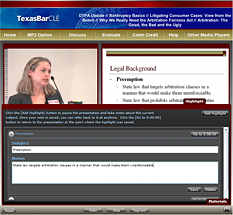
 Through TexasBarCLE.com, the State Bar has long offered the viewing of videos online for MCLE credit, but now has added a feature that allows the viewer to take and save notes within the presentation for future reference.
At its website, TexasBarCLE maintains its Online Classroom, housing hundreds of hours of recent MCLE-accredited videos. Choose an archived presentation and begin watching. At any time, click the Highlight tab, then click the Add Highlight button to pause the presentation and take a note about the current subject. Click Save to preserve your note; the video will then automatically continue where it left off. Once saved, your note may be referred back to at any time. Simply click Go to 0:00:00 (the time within the presentation) to go to the video at the point where the note was saved.
Should you return to the video on another day to review key points, your notes will be archived. Try out this new feature for yourself. Take a free online class here: http://www.texasbarcle.com/CLE/OCFree.asp.