

Big name companies, government agencies and individuals are all falling victim to “ransomware” attacks in record and still-rising numbers. Recently, Hollywood Presbyterian Hospital’s communications capabilities were disabled for 10 days before the hospital paid a ransom of 40 bitcoins – about $17,000 – and regained access to its system. And this week Medstar Health, a system of ten major hospitals in the Washington, DC area, reportedly suffered a similar attack. All this activity has led experts to label 2016 as “the year of ransomware.” And this new form of cyberattack requires a different approach to cybersecurity and incident recovery than your data breach prevention plan.
What is ransomware? Ransomware is malware that disables systems or encrypts data, critical system files and applications and demands a payment to re-enable or unlock them. There are two kinds of ransomware: “Locker,” which leaves data untouched by keeps owners from accessing it on their devices; and “Crypto-Ransomware” which leaves users with access to their computers but encrypts their files and applications; once the ransom is paid, the hackers send a decryption key.
A similar form of attack has also increased: cyber-blackmail. In these cases, the attacker copies confidential email and files of the target then threatens to release them publically unless a ransom is paid.
How does ransomware get onto companies’ systems? Ransomware may be downloaded in a variety of ways: via “phishing” schemes, in which employees are induced to click on harmful links or download harmful files; by downloading infected apps; or through compromised ads (known as “malvertising”) on mainstream sites. Hackers are increasingly sophisticated and creative in using a wide variety of means to introduce ransomware onto computers and mobile devices.
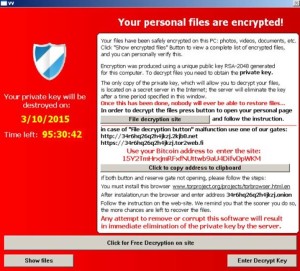
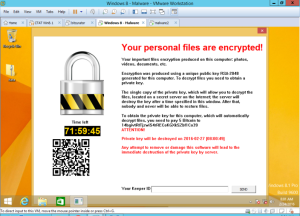
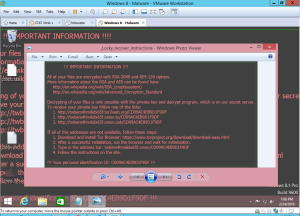
How do I know if my systems have been infected by ransomware? Ransomware encrypts files on the victims computers and flashes users a message instructing them to pay a ransom in bitcoin.
Example of “TeslaCrypt” warning
Example of “CryptoLocker” warning
Example of “Locky” warning
 How much ransom do the hackers demand? Most demands have ranged from the hundreds of dollars (for individual computers or mobile devices) to the tens of thousands of dollars, but the amounts appear to be increasing.
How do I protect my company from a ransomware attack?
- Back up all of your critical applications and data – and test the backup systems to be sure they can be restored before you have an attack.
- Make sure your system includes robust firewalls and that your Intrusion Detection/Prevention Systems are up to date.
- Whenever possible, keep data encrypted, whether in transit or stationary. While encryption will not prevent a ransomware attack, it will protect your data from being used for financial gain.
- Restrict access to sensitive files
- Ensure all employees are aware of the threats and methods of attack and are following sound cybersecurity policies
- Keep a copy of your emergency response plan – including phone numbers of key contacts – somewhere other than on your company’s systems.
What should I do if my company suffers a ransomware attack? Involve your outside counsel so that your decision-making process and investigation are protected by the attorney-client privilege. You then have several options: (1) Pay the ransom. In most cases, system access is restored after payment of the ransom, but there is no guarantee; (2) If you have backups and redundancies, you may be able to restore your systems without paying the ransom; (3) engage a security/forensic company for assistance in freeing your systems; (4) alert the Secret Service or other law enforcement agency. They may investigate, but may not be able to assist you in freeing your systems.
If I choose to pay the ransom, how and where do I get bitcoin?
Do not follow the payment links suggested by the ransomware as they may introduce malware that will further compromise your computers and files. In most cases, the ransomware will require payment by bitcoin because such payments cannot be reversed, and because it will be very difficult for anyone to identify the recipient. If your outside counsel has experience responding to ransomware attacks, they can help you with the logistics of buying and sending bitcoin. You will need to open an account with reputable bitcoin exchange and purchase sufficient bitcoin. Exchange companies may take up to a week to open your account, receive your bank’s ACH dollar transfer, and exchange the dollars into bitcoin. It will depend on the exchange company’s intake process, compliance procedures, and the amount of bitcoin you are purchasing. Once the bitcoin is in the bitcoin wallet associated with your account, you will be able to pay the ransom nearly instantaneously.
If you have specific questions regarding ransomware attacks and how to protect your company, please contact a Sheppard Mullin data privacy attorney.