

When it comes to smart phones, Lancaster’s technology lawyers Matt Landis and Brandon Harter rarely agree on anything. Brandon wisely chooses the superior flexibility offered by Google’s Android environment, while Matt continues to dogmatically do only what someone in a long-sleeved black T-shirt and jeans tells him.
In this post and in Matt’s counterpart, we managed to find some common ground: we can’t stand distracted driving. These posts will outline how features on an iPhone or an Android phone can reduce distractions and make the road a little bit safer for everyone.
With the release of Apple’s Do Not Disturb While Driving feature as part of iOS 11, it is worth taking the time to remind everyone that Android apps have been helping us manage this for years. In a nutshell, the app prevents distracted driving by: (1) silencing your phone so you cannot see new text messages until you arrive; and (2) gives you the option to automatically reply that you’re driving and will get back to them when you arrive.
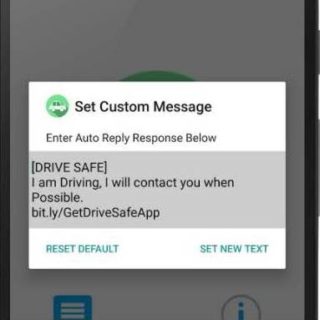 One example of a simple, yet effective, Android app that protects you in this way is Andrew Irwin’s Drive Safe. Drive Safe can be set to automatically enable when moving at highway speeds. You can also manually toggle it on and off (for those times you are riding shotgun and really do need to let your sister-in-law know that you are running 10 minutes late for dinner because your kid wouldn’t wear shoes… just… you know… hypothetically). Similar to the new iOS feature, Drive Safe also allows you to set an automatic reply. And if there is an emergency? Three incoming calls from the same person will cause Drive Safe to switch off so you can still be found.
Please consider enabling this feature on your Android phone to help reduce distracted driving and feel free to share with family, friends or others who might benefit from this feature. If you’ve got an iPhone consider replacing it with a superior Andriod phone. Or, I guess, you can check out Matt’s post on how to enable the similar feature on your iPhone.