

As a librarian, I use a lot of information resources. For news, I tend to rely on a pair of apps – one to aggregate random topic-oriented content, the other to enable access to specific publication content. The reality of today’s content environment is that you will run into paywalled content. The latest updates to Flipboard underscore how apps, in responding to publisher paywall and content requirements, reduce their utility. One element of this is the notoriously fractured paywall approach.
The paywall is a way to monetize content. But it tends to assume that you are accessing it through the web site (or an analog). As soon as you access it through a different means, you can find that your paid access no longer works or that the publisher’s attempts to funnel you into a payment are blocked because they don’t understand how their content appears in an app.
Paywalls Aren’t Simple
The most ludicrous paywall I’ve run into is the javascript-based one. This is the bailiwick of the small paper and reflects a lack of resources and perhaps also a lack of understanding about how browser visitors work.
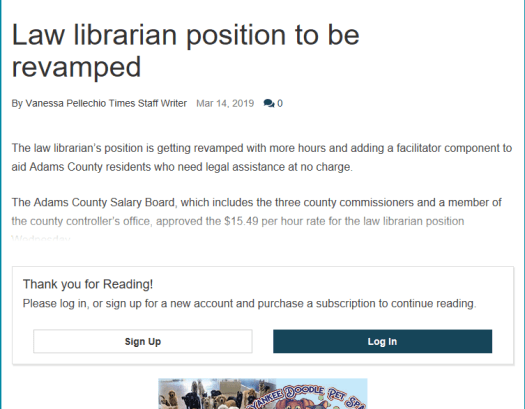
I recently visited a small news site to read an article about law libraries. First it told me to register, so I did. Then when I had registered and logged in, it told me I still needed a subscription. But the button didn’t work to pay, so I did what many information professionals would: I looked at the page’s source code. And immediately saw that the paywall was a pseudo-display block of content. They used cascading style sheets to create a subscriber-only class, and a javascript to seek registrations.
<div id="tncms-region-article_instory_top"
class="tncms-region hidden-print">
</div>
<div class="subscriber-only">
<p>The position had been partially funded
five hours every week and 50 percent of benefits
by the Adams County Bar Association in the past,
according to George.
</p></div>
The easiest step was to just turn off javascript to any supporting sites (the text is coming from the paper, but the other sites are just serving ancillary rubbish like ads). You could also fiddle with the CSS, I suppose.
Gettysburg Times paywall with javascript active 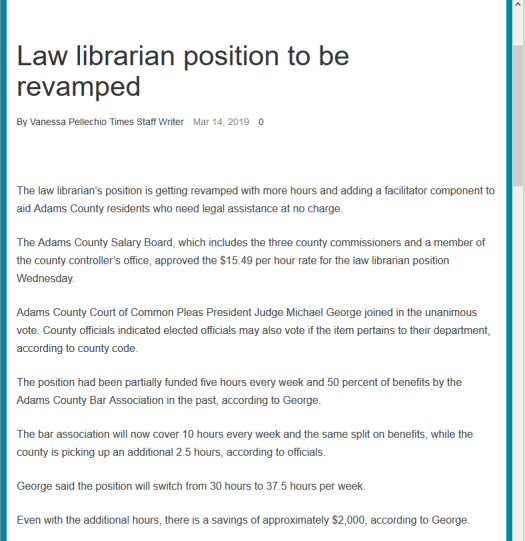 Same article, same browser, javascript disabled.
The concept of the paywall has permeated the landscape so that everyone thinks that every piece of content is worth paying for. If I used this paper all the time, perhaps. But if it’s the one time I’m going to use that content, it’s unlikely to convert me to a subscriber. Even less likely when the conversion process is cumbersome. It creates a disconnect between the value to the reader and the perceived value of the publisher.
When Apps Unbalance Towards the Publishers
An app isn’t a web browser but it needs to be able to replicate web content in the app, since publishers aren’t going to publish content just for an app. They may be able to mark up their content to make it easier for apps to grab, but that doesn’t seem to be happening.
I’m going to use Flipboard and the Washington Post as examples but they’re not unique. I find the same experience on Google News. And when people talk to me about news apps, I tell them to use a couple because content that throws a paywall on one may not on the other.
A recent update of Flipboard meant that the content was much more likely to load properly in the app. In the past, you’d sometimes see content that was clearly designed for web not quite reorient to an app. I have wondered if it was because the app width conflicted with the mobile-aware CSS in some news sites.
In any event, I started to notice an increasing number of paywall requests and warnings: you’ve used 1 of 3 pages, you’ve used all your pages, we see you’re enjoying…, etc. It completely makes sense that publishers are trying to monetize their content wherever it appears. Unfortunately, it’s poorly designed and inconsistent.
Here’s one from Foreign Policy that appears to trigger based on how far you are into the article. If you page to the bottom quickly enough, the paywall prompt doesn’t load. If you scroll back up to the top, it will suddenly appear. Many paywall modal dialogs leave the page below scrollable so you can still read the article underneath.
 Foreign Policy paywall nag at bottom of Flipboard screen, but modal dialog bypassed.
I would use a New York Times example but it’s so broken that the example doesn’t really work. The typical way that a web site will block the content is to make the underlying content semi-transparent and throw a modal dialog on top. When web content does this in an app, and not in a web browser, the dialog may not actually be visible to the reader. With the New York Times, you just end up with an obscured web page and nothing to interact with.
The Washington Post does a better job of dunning readers who aren’t subscribers. In their case, after 3 articles per day, you see a full screen ask for a subscription.
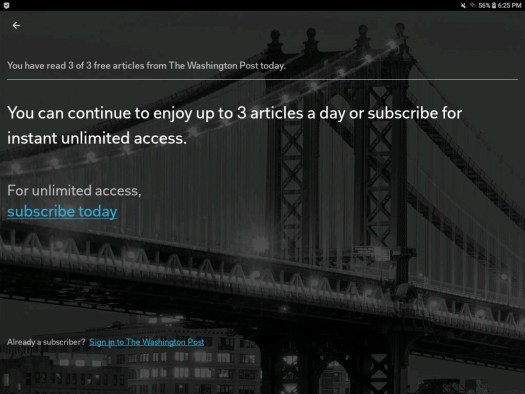 Washington Post subscriber paywall screen inside the Flipboard app
This makes sense, if everyone involved assumes that the only way that I will access Washington Post content. I expect Flipboard and Washington Post might make that assumption. I have 3 web browsers on my tablet and 2 news apps, so in fact, I can access it 5 ways when I’m away from my desktop PC.
The paywall becomes more like a punctured tube of toothpaste then. If I’m blocked on one app, I can just move to another. Press hard enough and the toothpaste will come out some hole. For whatever reason, I can look at unlimited Washington Post content in a browser on the same tablet as the Flipboard app.
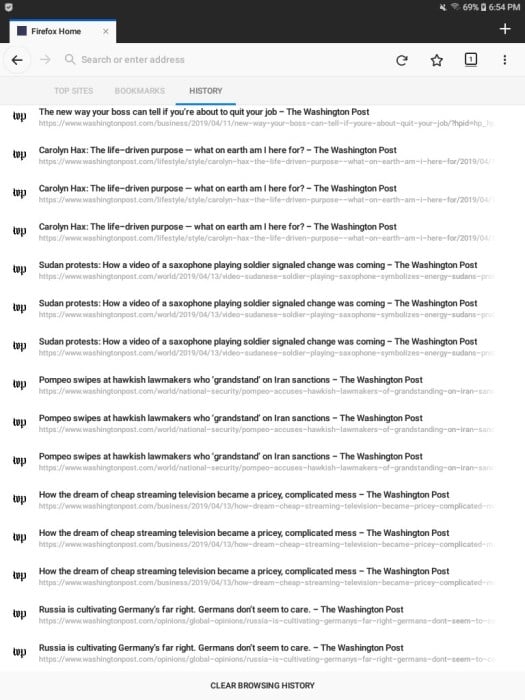 Same tablet, different app, same day and same publisher. The paywall trigger within the app doesn’t have any impact outside the app.
You can see the attraction of Apple News+ for readers who get fed up with having to work around paywalls. I suppose it may make sense for publishers too, although I’d be worried that it would further soften my readership.
But it doesn’t make sense for the librarian, who is more likely to work at the long tail of content. When I’m operating in a good enough research environment, then getting access to every piece of content is preferred but not required. Putting my researcher or institution in the position of subscribing to every publication for any article access isn’t going to happen. This is the same reason that publisher-specific apps have no long term hope of success unless it’s the ONLY way to get that content.
I’m much more likely to document (as in this post) my workrarounds for porous paywalls. As I have said before, an app is going to have to have far more integration (support for multiple individual subscriptions) and also much more ability for me to manage the experience.
And the Ads Return
One thing I’m finding increasingly annoying in this rebalancing towards the publisher is the increased tracking and advertising that is occurring in app. Normally I would limit this in a web browser. It definitely weighs against using an app that allows them through a back door.
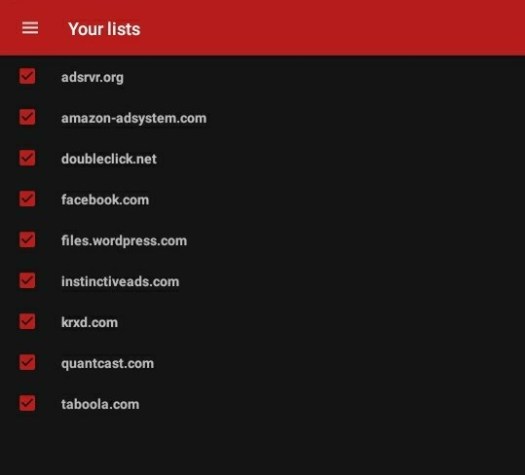
I use the Ad-Away app to access my tablet’s hosts file and block most ads. When I noticed that I was now getting auto-playing video ads and other junk, I realized I’d have to tweak my settings. You can download pre-built lists and then customize your own. I block all Facebook and Doubleclick requests.
It looks like some publishers are now loading the files from their WordPress driven web sites as well. Rolling Stone seems to load its video house ads this way, so I am now blocking files.wordpress.com.
It’s interesting to watch the app developers and the content publishers try to find a way to make this work. I appreciate the experimentation, except that it seems to focus on very specific types of content consumers.
You can see why a publisher would rather push a link into social media that returns a reader to the web site. It’s an experience they can tightly control. Once the content starts appearing in other places, it complicates both the publisher and the readers’ experiences.