

Law firms handle highly sensitive data, making them prime targets for cyberattacks. Yet, weak password practices remain a major vulnerability. Here’s what you need to know:
- 81% of breaches involve weak or stolen passwords.
- 52% of U.S. adults reuse passwords, creating a chain reaction of risks.
- A single compromised password can cost a firm $4.56 million on average.
Key Mistakes to Avoid:
- Weak passwords like “LawFirm2026” or personal info that’s easy to guess.
- Reusing passwords across personal and professional accounts.
- Writing down or sharing passwords, risking unauthorized access.
- Skipping multi-factor authentication (MFA), which blocks 99% of attacks.
- Not using password managers, leaving security inconsistent and chaotic.
Quick Fixes:
- Use unique, strong passwords (16+ characters with symbols).
- Implement firm-wide password policies for consistency.
- Adopt password managers to securely store and manage credentials.
- Enable MFA on all accounts for an extra layer of protection.
Bottom Line: Weak password security isn’t just risky – it’s a professional liability. Strengthen your firm’s defenses today to protect client trust and avoid costly breaches.
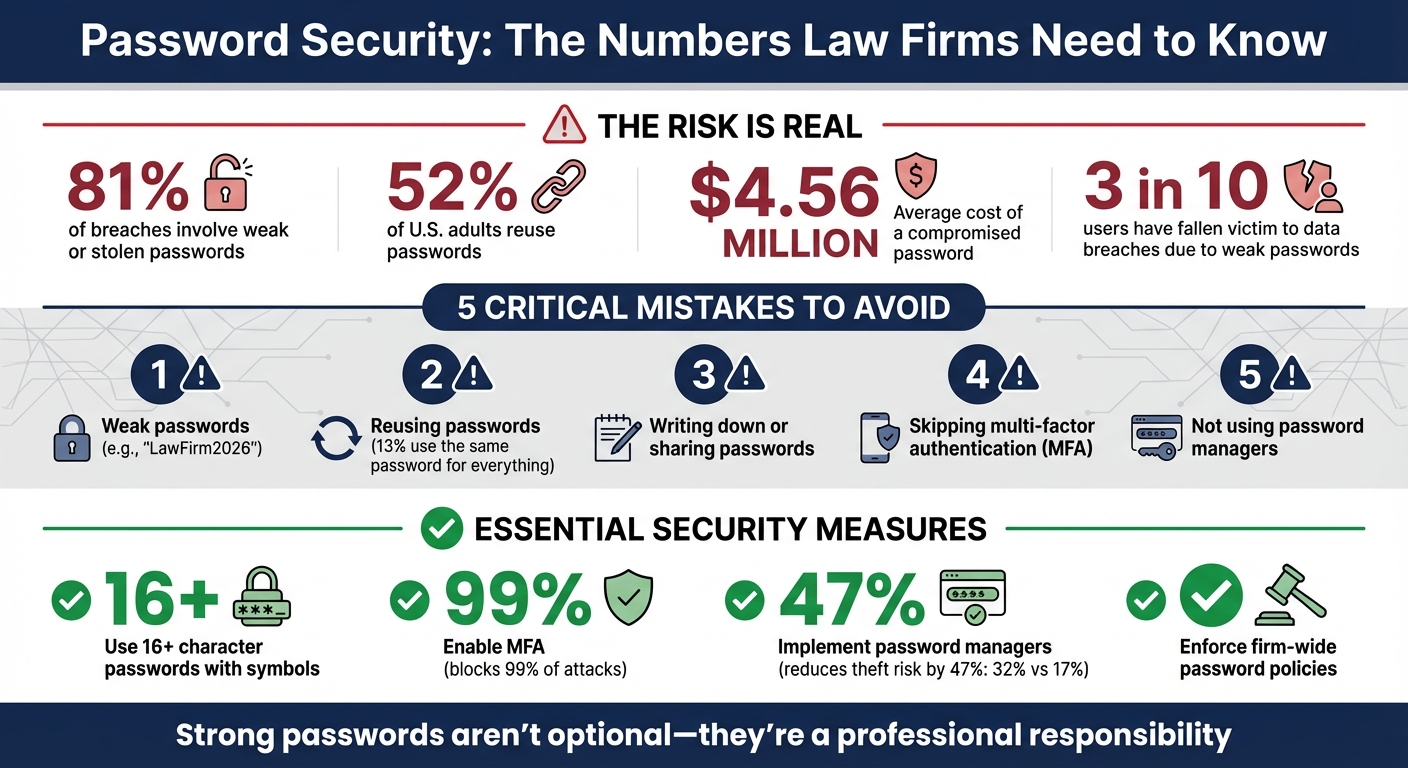
Password Security Statistics and Best Practices for Law Firms
Common Password Management Mistakes in Law Firms
Legal professionals handle some of the most sensitive data imaginable, yet common password management errors often leave law firms vulnerable. Recognizing these mistakes is a crucial step toward protecting client confidentiality and securing firm operations.
Using Weak or Simple Passwords
Weak passwords are a major Achilles’ heel for many legal professionals. Choices like “password123”, “LawFirm2026”, or even personal details such as birthdays or children’s names are far too common. These are easy targets for hackers, especially since three in 10 users have fallen victim to data breaches due to weak passwords.
“Passwords are the key to your network, and a weak password leaves your firm at risk.” – Michael Martin, Tabush Group
The problem gets worse when attorneys and staff use personal information that’s easily found online – like LinkedIn profiles or firm bios – to create passwords. It’s like leaving the front door unlocked for cybercriminals. And if weak passwords weren’t bad enough, reusing them across multiple platforms adds fuel to the fire.
Reusing Passwords Across Multiple Accounts
Password reuse is shockingly common, even among professionals. Over half of U.S. adults (52%) reuse passwords, and 13% use the same password for everything. For law firms, this habit can lead to a chain reaction of security breaches. For example, if an attorney uses the same password for both their Netflix account and the firm’s document management system, a breach at Netflix could expose sensitive client data.
“Reusing passwords is dangerous… when (not if) your credentials are captured or stolen on one site, you become vulnerable on every other site that uses those same credentials.” – Essential Solutions
This domino effect doesn’t stop at one compromised account. Hackers can use a single stolen password to access billing systems, practice management software, and confidential case files. And the risk isn’t just digital – poor password-sharing practices can also undermine security.
Writing Down or Sharing Passwords
A sticky note on a monitor or a shared Excel file labeled “Office Passwords” might seem harmless, but these practices are a goldmine for anyone looking to exploit your systems. Physical notes can be copied by anyone with access to the office – be it visitors, cleaning staff, or even other employees. Digital files stored on shared drives or emailed without protection are just as risky.
When passwords are shared among staff, it becomes impossible to track who accessed what, opening the door to misuse. The risk balloons when shared passwords aren’t updated after an employee leaves. Failing to change shared passwords after offboarding leaves systems exposed to former staff.
Not Using Multi-Factor Authentication
Even the strongest password isn’t enough on its own. 81% of hacking-related breaches involve stolen or weak passwords. Without multi-factor authentication (MFA), a stolen password grants hackers full access to firm systems. MFA adds a critical second layer of security by requiring additional verification, like a text code or app-based confirmation.
“A password is only something you know, and it can be stolen, guessed, or leaked through a data breach. MFA goes beyond just passwords, requiring users to verify their identity through multiple methods before gaining access.” – Michael Martin, Tabush Group
The American Bar Association experienced this firsthand when hackers accessed credentials belonging to approximately 1,466,000 members. MFA could have blocked the attackers even after they obtained passwords. Yet, many firms still hesitate to enable this essential security measure, leaving themselves exposed to phishing and credential theft.
Avoiding Password Managers and Policies
Without password managers or clear policies, many firms operate in chaos. Staff often resort to weak, default passwords or fail to update credentials regularly. This lack of structure makes it impossible to enforce strong security practices, like requiring complex passwords or ensuring they’re updated after a breach.
The absence of formal policies also creates inconsistency. While some employees might use strong passwords, others might stick to something like “Summer2026” across all accounts. Hackers actively target these weak spots. Users who don’t use password managers are nearly twice as likely to suffer identity or credential theft compared to those who do (32% vs. 17%). Centralized tools not only simplify password management but also reduce risks tied to weak passwords, reuse, and unauthorized sharing.
Solutions to Improve Password Security in Law Firms
Improving password security in law firms involves a few key adjustments that can significantly reduce risks and protect sensitive client information. These changes directly address the common issues of weak passwords, password reuse, and careless sharing practices.
Creating Strong, Unique Passwords
A strong password is your first line of defense. For optimal security, aim for passwords that are at least 12–14 characters long, though 16 characters is ideal. Use a mix of letters, numbers, and symbols to make your passwords resistant to brute-force attacks.
“Safe passwords are only used for one set of credentials and cannot be easily guessed. Length is of the utmost importance. I recommend using at least 16 characters.” – Paul Telesco, VP of Technical Services, Frontline Managed Services
Passphrases can be an effective alternative to random strings of characters. For instance, a phrase like “I Love My Pasta Al Dente” would take an astronomical amount of time – roughly 60 septillion years – for a botnet to crack. Avoid using personal details such as birthdays or names, as these can be easily discovered online. Additionally, using a unique password for every account ensures that a single compromised credential doesn’t lead to widespread access.
To make this approach work across the firm, clear and consistent policies are essential.
Implementing Firm-Wide Password Policies
Consistency in password practices starts with firm-wide policies. These policies should establish minimum length and complexity requirements while mandating immediate password changes in specific situations, such as lost devices or suspected account breaches.
Modern cybersecurity experts advise against frequent, forced password changes, as they often lead to predictable patterns. Instead, focus on updating passwords after a breach or when an employee leaves the firm.
When staff depart, it’s crucial to update shared and administrative credentials promptly. Regularly reviewing and auditing password policies ensures your firm stays prepared for new and evolving cyber threats.
Using Password Managers
Technology can play a vital role in strengthening password security. Password managers simplify the process by generating, storing, and managing credentials in an encrypted vault. This means employees only need to remember one strong master password. Many password managers also include features like built-in generators and dark web monitoring, further enhancing security.
Enterprise-grade password managers offer additional benefits, such as secure credential sharing, compliance-friendly audit trails, and syncing across devices. They also streamline the process of updating credentials when team members leave, ensuring continuity without compromising security.
“Efficiency is important, but a security breach caused by a weak password is not worth the headache or significant cost it will entail.” – Paul Telesco, VP of Technical Services, Frontline Managed Services
To maximize the benefits of a password manager, set a strong master password using a phrase that’s easy to remember but hard to guess. Avoid storing passwords directly in your browser, as this can expose them to vulnerabilities.
Adding Multi-Factor Authentication for Better Security
Strong passwords and password managers are a great start, but multi-factor authentication (MFA) takes security to the next level. By requiring additional verification, MFA tackles the risks posed by weak or reused passwords, offering an extra layer of protection.
MFA ensures that even if a password is compromised, unauthorized access is still blocked without the additional authentication factor. In fact, implementing MFA can prevent 99% of account-compromising attacks. This is why professional liability insurers and regulations like HIPAA and GDPR are increasingly mandating its use.
How does it work? MFA relies on at least two independent factors to confirm a user’s identity:
- Something you know: A password or PIN.
- Something you have: A smartphone, hardware token (e.g., YubiKey), or similar device.
- Something you are: Biometric data like a fingerprint or facial recognition.
For added security, use authenticator apps such as Google Authenticator, Microsoft Authenticator, or Duo instead of SMS codes, which can be vulnerable to SIM-swapping attacks.
Steps for Effective MFA Implementation
Start with your email accounts, as they’re typically the gateway for resetting passwords on other platforms. Once secured, extend MFA to essential tools like Office 365, Google Workspace, and law practice management software. For ultimate protection, especially for administrative accounts, consider physical USB keys like YubiKey.
“Truth and wisdom in identity management is a collection of verification processes–the more you have, the greater your chances in defending your systems from cyber attacks.” – Justine Phillips, Partner, Baker & McKenzie
To strengthen your MFA setup, train employees to avoid approving login prompts they didn’t initiate – this counters “MFA fatigue” attacks, where users are bombarded with repeated notifications until they accidentally approve one. Also, secure MFA devices with a PIN or biometric lock to prevent unauthorized access.
sbb-itb-95f4849
How Legal Software Supports Password Security
Legal practice management software strengthens password security by tackling common vulnerabilities often found in law firms.
One standout feature is role-based access control (RBAC). Instead of granting blanket access to everyone, tools like The Legal Assistant assign permissions based on specific roles. For instance, paralegals, associates, and partners only see the information necessary for their work. This aligns with the principle of least privilege, ensuring that even if one user’s credentials are compromised, the damage is contained. By limiting access, the risk associated with weak or reused passwords is significantly reduced.
Single Sign-On (SSO) integration is another game-changer, especially for cloud-based platforms. Remembering dozens of passwords can be overwhelming, but SSO simplifies this by allowing users to access all work-related applications with a single, secure, multi-factor authentication (MFA)-protected credential. This is particularly important when you consider that 52% of U.S. adults admit to reusing passwords across multiple accounts.
Beyond SSO, cloud hosting adds another layer of security. For example, The Legal Assistant’s cloud hosting includes centralized security management and audit trails. These trails log who accessed specific data and when, helping to identify suspicious activity like logins from unknown locations or repeated failed password attempts – potential signs of brute-force attacks. Features like account lockouts after a set number of failed login attempts further protect against unauthorized access.
“Cloud-based software presents a viable option for enhancing cybersecurity in law firms. Despite inherent risks like data breaches, reputable cloud service providers offer robust security measures in comparison to traditional servers.” – American Bar Association
Additionally, legal software consolidates security measures by enforcing MFA, requiring strong password policies, and swiftly revoking access when employees leave the firm. This centralized approach ensures tighter control over sensitive data.
Conclusion
Password security isn’t just a technical requirement for law firms – it’s a professional responsibility. The numbers make it clear: strong password policies are critical. Your firm’s reputation, client trust, and adherence to ABA standards depend on implementing these safeguards.
The steps are simple but essential: stop reusing passwords, enforce multi-factor authentication (MFA), and adopt a password manager. These measures are non-negotiable for protecting sensitive client information. Ignoring them opens the door to fines, disciplinary actions, and damage to your firm’s reputation.
“The legal profession is held to a higher standard when it comes to safeguarding confidential information… a password breach can lead to claims of negligence, regulatory investigations, or disciplinary action.” – Zenzero
To address these risks head-on, start with a password audit, enable MFA across all accounts, and enforce firm-wide policies requiring passwords of at least 12–14 characters. For a seamless approach to integrating these security measures, consider practice management tools like The Legal Assistant. Features such as role-based access control, cloud hosting with audit trails, and centralized security management can help protect your firm while maintaining efficiency.
Don’t wait – secure your firm today. Remember, your firm’s protection is only as strong as its weakest password.
FAQs
Why is multi-factor authentication important for law firms?
Multi-factor authentication (MFA) provides an extra shield of security by requiring users to confirm their identity using more than one method – like a password paired with a one-time code. Without MFA, law firms are more susceptible to breaches caused by weak or stolen passwords, putting sensitive client information at risk of cyberattacks.
By incorporating MFA, law firms can better safeguard confidential data, meet data security requirements, and lower the chances of expensive security incidents. For firms managing sensitive legal cases, this added layer of protection is not just helpful – it’s essential.
How do password managers enhance security for law firms?
Password managers play a crucial role in improving security for law firms by safely storing and creating strong and unique passwords for each account. This approach reduces the chances of weak passwords, reusing the same password across multiple accounts, or exposing sensitive client information to unauthorized access.
These tools also automate the entire password management process, cutting down on human errors and ensuring adherence to security best practices. This allows legal professionals to concentrate on their work without worrying about potential security risks.
Why is reusing passwords risky for legal professionals?
Reusing passwords poses a serious risk for legal professionals, as it opens the door to security vulnerabilities. If even one account is breached, any other account using the same password becomes an easy target. This could result in unauthorized access to sensitive client or case details.
Legal work often involves handling highly confidential information, so password reuse can lead to devastating outcomes – think data breaches, loss of client trust, or even compliance violations. To guard against these risks, always create unique and strong passwords for each account. For an extra layer of protection, using a password manager can simplify the process and enhance your firm’s security.
The post Common Password Management Mistakes in Law Firms appeared first on The Legal Assistant.